Back to ABBYY Blog
ABBYY Timeline 6.0 Accelerates Operational Excellence by Helping Organizations Find their ‘Primary Path’
January 31, 2023
January 31, 2023

ABBYY’s latest release of Timeline Process Intelligence adds new capabilities to make process mining more accessible, easier to use, and understand business operations. When discussing process intelligence with our customers, consistently we hear how important it is to be able to quickly and easily understand how processes execute, how people work, and to communicate this to executives and automation teams alike to transform work.
Watch our webinar on-demand to see ABBYY Timeline's latest capabilities in action.
We hear you loud and clear, and that is why we’re excited to announce the new capabilities of the latest ABBYY Timeline 6.0 release that aligns with your company’s business goals and outcomes.
Timeline 6.0 introduces a fresh look with a redesigned interface. This update provides a smoother user experience that is more intuitive, convenient, and functional to explore and examine processes in detail. The newly updated navigation paths reveal detailed usage, data, and context. The logical grouping of elements and the general design approach consists of better flows and operational configurations for how analysis is performed.
In Timeline 6.0, the Process Schema has undergone colossal changes, dramatically expanding the functionality while retaining familiar features. It is enhanced with a new schema type called Primary Path, which helps to see the most frequent and common flow of events. Furthermore, the Primary Path is powered by a set of controls that allow finding deviations from the common flow, the reasons for such deviations, and revealing them from different perspectives.
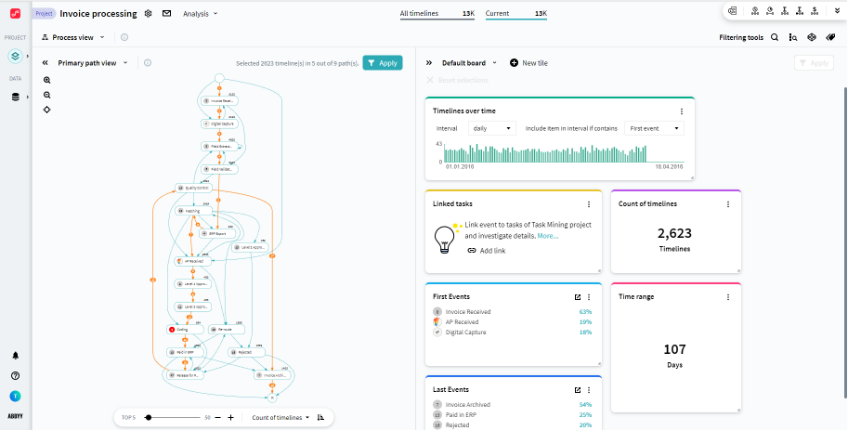
Additionally, this feature brings a new schema with a highly interactive dashboard to gain granular insight into any dimension of process execution. Configure the flexible dashboard with custom visualization of facts, metrics, and graphs.
Schema and Views are co-dependent, which means that the change of data in tiles will impact the schema, and if the schema structure is altered the data is recalculated on the View board accordingly. This interaction guarantees the displayed data is up-to-date and gives you freedom of action in your analysis tasks.
The set of supported data sources is expanded. Since Timeline 5.3, there are third-party Open Database Connectivity (ODBC) drivers available for a wide range of databases, making it possible to upload data from various databases like PostgreSQL, MS SQL, and Oracle. The ODBC connector is available as an External Import Adapter in the ETL (Extract, Transform, Load Repository) Data Sources configuration.
Simulate potential changes in processes and evaluate the impact of these changes on the entire business process. With the process simulation feature in ABBYY Timeline, you can assess the effectiveness of process optimization decisions. 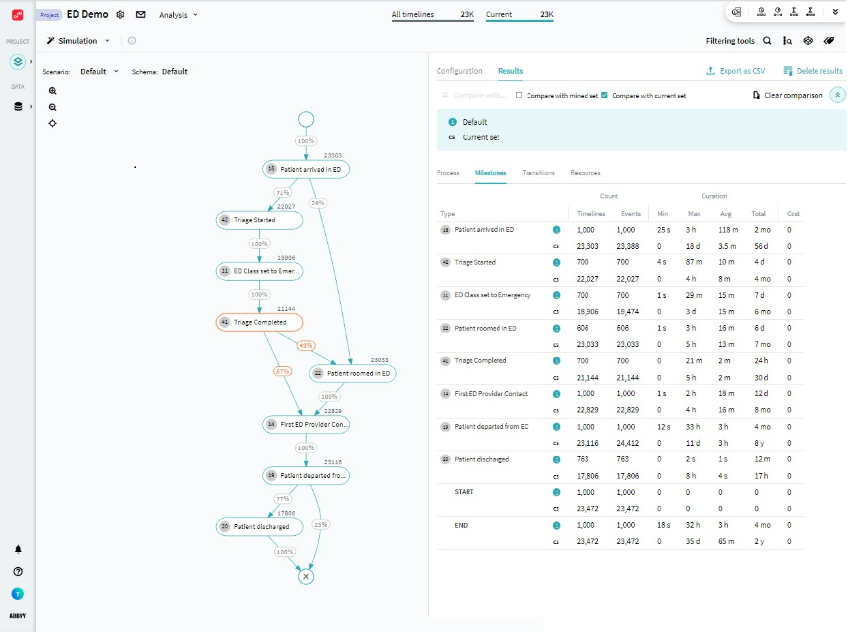
Analyze desktop user interaction and seamlessly link it with process details to better connect the dots between your people, processes, and content. In the previous Timeline 5.3 release, the task mining functionality became much more powerful and user-friendly.
In task mining projects, you can now easily switch between data sets. All views will correspond to the chosen task, and you can change it from any view when needed.
Task mining obtained a fundamentally new approach to recording and analyzing user actions—Forms. A Form is a set of subsequent user actions in one application, window, or web page. They are detected automatically by the program, and you can check them in the Form Editor view
Form Editor is a brand-new feature that allows you to review automatically detected forms to improve the Task Definition quality. This permits you to have more control over the result, making the analysis handier and more precise.
In the previous Timeline 5.3 release, we introduced several capabilities in the Task Definition Editor mechanism that gives you the freedom to set tasks according to your needs. Concurrent and parallel tasks are now supported; you can set them manually in this interface to ensure maximum accuracy of future analysis. This functionality now offers the following possibilities.
The essential task attributes now can be exported to PDD (Process Definition Document) as the description of a task. This document outlines the task and its properties in PDF format or as a Microsoft Word document and can serve as a basis for creating automation solutions. It allows users to undertake preliminary research of the common workflow, assess what systems are involved in the process, the frequency of events occurring, the presence of decision points affecting performance, and elaborate opportunities for process unification.
At the same time, it is a comprehensive tool to form a vision of the automation direction and figure out an ideal image of the process, and then convert it to development requirements. Its flexible visual configuration makes it possible to get familiar with complex processes in an intelligible and illustrative manner, that is easy to share.
Starting from Timeline 5.3, all your personal data will be deleted when the time period for a subscription being suspended is over. Subscription becomes suspended when its validity expires, you will receive a series of email notifications to warn you in advance about subscription expiration. After being suspended for 30 days, your data in project and repositories, account, and subscription records will be erased.
If data is the lifeline to your business, then second-up is knowing that operationally, the systems and processes are performing optimally. To have that visibility, we have introduced a new data warehouse into ABBYY Vantage that stores all process transactional data, and in the future, quality analytics data will be available.
Built to connect into ABBYY Timeline, the new data in Vantage warehouse provides a clear path forward to analyze and monitor process execution, manage quality and operational controls, ensure processes are meeting SLAs, analyze and monitor end-to-end flow of work, and get an end-to-end view by combining document transactional process data with other key systems.
Visit the ABBYY Timeline webpage
To request a trial of ABBYY Timeline, please contact us here.