July 16, 2026
Every day, enterprise document workflows process thousands of files that contain information no one should be able to recover accidentally: Social Security numbers, tax IDs, bank account details, confidential legal clauses. Extracting and routing that data efficiently is one challenge. Making sure the underlying document images stay safe after export is another.
The ABBYY Document AI platform now includes built-in field-level redaction that permanently removes sensitive data from exported images before they leave your processing environment.
Jump to:
Why sensitive data in document archives is a growing risk
How field-level redaction works in the ABBYY Document AI platform
How to configure redaction in the Output Activity
Where redaction protects your organization
Organizations running high-volume document workflows face a specific risk that is easy to overlook: the processed image archive. A document skill can extract a Social Security number for a payroll system, route invoice totals to an ERP, or pull borrower details into a loan management platform. That part works well. But the source image, still containing all of that sensitive data, often ends up stored or shared long after the extraction is complete.
The risk extends beyond the archive. When general-purpose large language models (LLMs) are part of the processing pipeline or used within an agentic workflow, unredacted document content sent to an external model creates an additional exposure point. Confidential fields and PII that leave your environment as part of an LLM prompt are no longer under your direct control. Redacting sensitive fields before document content reaches an external model is a critical step in keeping that data protected.
Regulations such as GDPR and CCPA add further pressure, requiring organizations to minimize the personal data they retain and demonstrate proactive data protection practices.
Manual redaction does not scale. Reviewing and blacking out fields document by document is slow, inconsistent, and impossible to enforce at enterprise volumes. The answer is automating redaction as part of the document processing pipeline itself, at the point of export, before an image ever reaches storage.
The redaction feature, introduced in ABBYY Vantage, is built into the Output Activity of the Skill Designer. When a document is processed and results are ready for export, the platform applies redaction to any fields you have designated as sensitive. The output is a sanitized image suitable for archiving or sharing, while the structured data extracted from those fields continues to flow into your business systems as normal.
When a field is redacted, two things happen simultaneously:
This distinction matters. Many redaction approaches only cover the visual layer, leaving the underlying text in a PDF's selectable text layer accessible to anyone who knows to look. The ABBYY Document AI platform removes the data from both layers, making the redaction permanent and complete.
Redaction applies only to the exported document image. The structured data extracted from a redacted field, such as a tax ID or home address, still passes downstream to whichever business system needs it, in full. Your payroll system gets the data it requires to process payments. Your case management platform receives the loan details it needs for decisioning. The only copy that changes is the archived image, which is stripped of the sensitive values it would otherwise carry indefinitely.
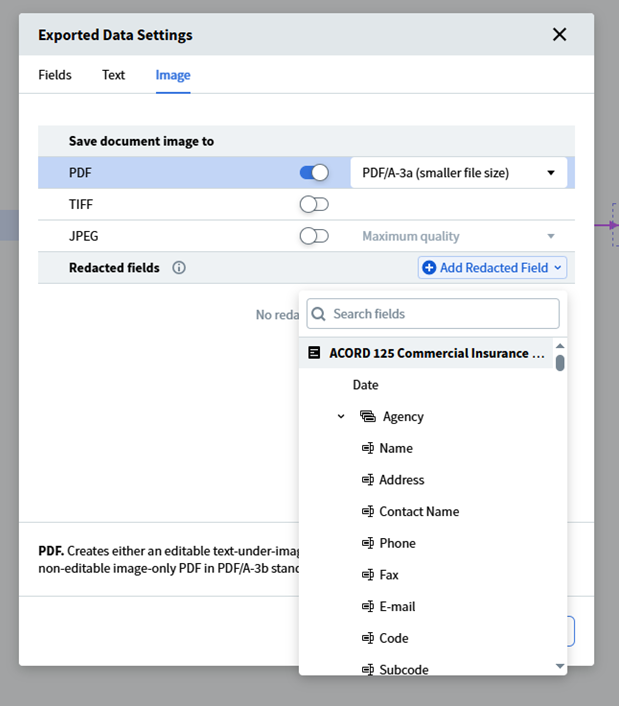
Configuring field-level redaction requires no custom coding. The setup is done entirely within the Skill Designer and takes only a few steps.
For the full technical reference, see the Output Activity documentation.
HR and finance documents are among the richest sources of sensitive personally identifiable information (PII) in any organization. Onboarding forms, contractor agreements, and tax documents such as 1099-C forms typically contain names, addresses, Social Security numbers, and bank account details.
A skill configured to process these documents can extract the relevant fields for downstream systems while redacting the sensitive identifiers on the exported image. Your payroll system gets the data it needs. The archived copy of the form shows blacked-out fields wherever PII appeared. If that archived document is accessed by someone without authorization, the private data remains completely protected.
Legal teams regularly need to share contracts with third parties: regulators, auditors, external counsel, or counterparties in a negotiation. Sharing an unredacted document introduces risk. Redacting manually introduces delay and inconsistency.
With the ABBYY Document AI platform, a mortgage note, lease agreement, or contract rider can be processed through a skill that extracts the metadata needed for a case management system and simultaneously redacts borrower details, financial terms, or confidential clauses from the exported PDF. The result is a document ready for external sharing, with sensitive content permanently removed and no manual intervention required.
Both GDPR and CCPA are built on a principle of data minimization: organizations should retain only the personal data they genuinely need, for only as long as necessary. Document archives are a common compliance weak point. A scanned form stored for audit purposes may contain far more personal data than the audit actually requires.
Implementing redaction at the point of export directly addresses this. Sensitive fields are removed from archived images before they enter long-term storage, narrowing the compliance scope and reducing the risk surface. This approach also makes it easier to demonstrate proactive data protection to auditors and regulators, a factor that carries significant weight in GDPR and CCPA enforcement reviews.
The ABBYY Document AI platform supports over 150 pre-configured document skills covering document types from invoices and purchase orders to insurance denial forms and certificates of analysis. Redaction integrates with any skill that uses an Output Activity, which means the same approach applies across the full breadth of document types your organization processes. Whether the workflow handles financial statements, medical intake forms, or shipping documentation, the same configuration pattern applies.
Organizations increasingly deploy agentic workflows that use large language models for reasoning, decision-making, and analysis. However, sending sensitive files or personally identifiable information to an external model introduces major compliance risks. The ABBYY Document AI platform solves this challenge by redacting private data before export and before the content ever reaches an external model. This ensures that your organization keeps privileged information secure, compliant, and within your governed pipeline.
Redaction has traditionally been treated as a post-processing task, something teams do after the fact when a document needs to be shared or archived. The ABBYY Document AI platform repositions redaction as a native step in the processing pipeline itself, configured once and applied consistently to every document that follows.
For organizations processing sensitive documents at volume, this changes the risk profile significantly. Archived images no longer carry the sensitive data they once did. Compliance with data minimization requirements becomes easier to demonstrate. And the manual effort previously spent on document-by-document redaction is eliminated entirely.
To configure redaction in your own skills, start with the Output Activity documentation. To explore the broader capabilities of the ABBYY Document AI platform, visit www.abbyy.com/ai-document-processing.
Field-level redaction is a feature in the Output Activity of the Skill Designer that permanently removes selected fields from exported document images. Redacted fields appear as blacked-out areas on the exported image, and the underlying data is also removed from the PDF text layer so it cannot be recovered or copied.
No. Redaction applies only to the exported document image. Structured data extracted from a redacted field, such as a tax identification number or bank account, still flows to the downstream business systems configured in your skill. Only the archived image is modified.
No. Redaction is configured entirely through the Output Activity settings in the Skill Designer. You select the fields you want to redact, publish the skill, and the platform applies redaction automatically to every document processed from that point forward.
No. Once a file is exported with redactions applied, the original values are permanently gone from the exported copy. The data is removed from both the visual image and the text layer of a PDF, which means it cannot be recovered by selecting text or using assistive tools.
Redaction is available for any skill that uses an Output Activity. This covers the full range of document types the ABBYY Document AI platform supports, including invoices, tax forms, contracts, HR documents, insurance forms, and more.
Both GDPR and CCPA require organizations to minimize the personal data they retain. By redacting sensitive fields from exported images at the point of processing, organizations reduce the volume of personal data stored in document archives. This narrows the compliance scope and demonstrates proactive data protection to auditors and regulators.
The complete reference for configuring the Output Activity, including the redaction feature, is available at docs.abbyy.com.

Slavena Hristova
Director of Product Marketing, Document AI at ABBYY
Slavena Hristova is a seasoned product marketing leader specializing in AI-powered intelligent document processing, OCR, and business process automation. As Director of Product Marketing at ABBYY, she drives the global strategy for the Document AI product line, shaping its market positioning, go-to-market execution, and customer adoption.
With deep expertise in product marketing and management, Slavena bridges the gap between technology and business needs, enabling organizations to harness AI-driven automation for smarter document workflows. Passionate about innovation and the evolving role of AI in enterprise automation, she brings a strategic and results-driven approach to transforming how businesses process and extract value from their data.
Follow Slavena on LinkedIn.
