
Back to ABBYY Blog
FineScanner AI – a Revolution with Artificial Intelligence
May 29, 2019
Editorial note: FineReader PDF Mobile for Android, Business Card Reader for Android, and Text Grabber for Android & iOS have been discontinued since September 2023. You can learn more about that here.
You get to witness the birth of intelligent mobile scanning. We’re proud to present our new scanner incarnation — FineScanner AI. Smart, safe, fast. The biggest update ever with neural networks and new OCR is coming to iOS and Android.
Look how it works:
Finds only the documents you need
FineScanner AI is now even faster and easier to use thanks to the new Smart gallery function: FineScanner AI has “learned” to automagically seek out images of documents with text in your gallery.
Let’s say you urgently need to find a contract that you took a photo of on the fly a year ago. Try to remember how many photos you’ve taken over the last year. That number will likely be in the hundreds. FineScanner AI will ignore all photos that aren’t relevant and will select only the images that contain text, meaning you won’t have to scroll through your gallery full of sunset and cat pictures ;)
As soon as you choose a document, FineScanner AI will improve its quality by removing the background (for example, the desk that you took the photo on), correcting the perspective, shaping the photo into a proper rectangle, and using filters to improve the brightness and contrast. This means that the right file is found and turned into an ideal scanned copy. Now you can insert a signature and mark parts of the document using “PDF Tools” (available on iOS). Don’t forget to add a “Siri Shortcut” to the document (available on iOS), so that you can quickly open it with a voice command.
Images with text are looked for using a neural network that we have developed ourselves, based on Apple’s Core ML and Google’s TensorFlow Lite. The images are sorted directly on your phone without the need for an internet connection, meaning this feature will work offline as well. To create a neural network that works properly, we have been training and improving our network for over a year, making it sort through hundreds of thousands of images. We are particularly proud of its image processing speed — about 13 milliseconds per file. By the way, this is the same amount of time needed for the human brain to process an image.
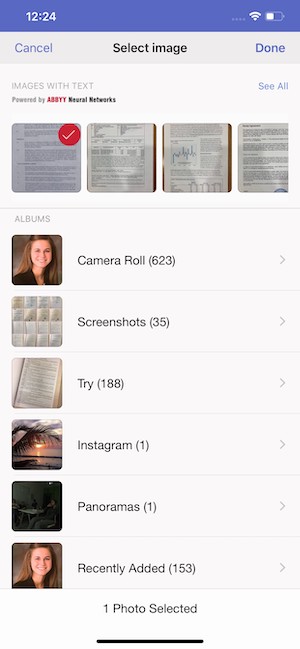 Smart gallery on iOS
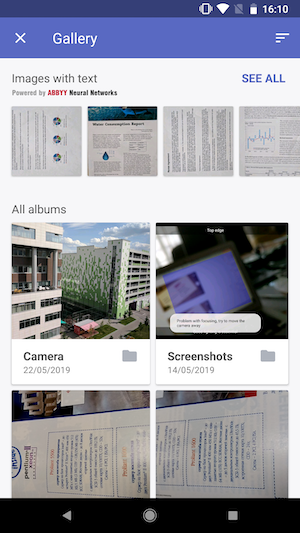 Smart gallery on Android
How exactly does it work?
- Launch FineScanner AI.
- Tap the + button.
- In the lower right corner, tap on the gallery icon.
- You will be taken to an improved version of your gallery — there, magic will be happening.
- At the top, a new section called “Images with text” will appear. There, the AI will sort your images and suggest those that contain text.
- You can scroll left and right through the sorted images, or you can tap “See all” to see all documents found by the neural network.
- Choose one or more images for further processing.
After that, it’s back to the usual routine… Or is it?
OFFLINE text recognition
If you thought that was all — you were wrong. ;) Besides “Smart Gallery”, another new feature implemented in this update is the long-awaited offline text recognition feature. If you need the text to be processed immediately and as privately as possible — select “Plain Text”. After a couple of seconds, you will have a saved TXT file (without the source formatting). The text recognition takes place on your device without any communication with the server and supports 63 languages. You can select up to three different languages for a single document.
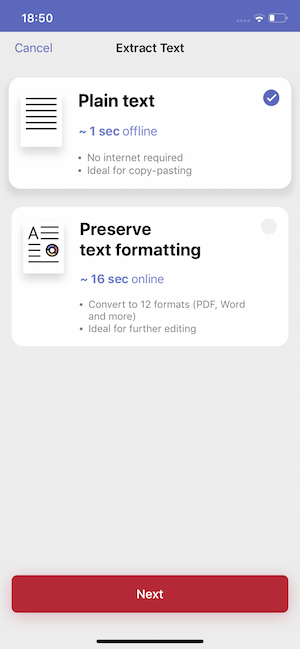
Now, a lack of internet and expensive data when travelling abroad will no longer prevent you from using FineScanner AI – you can now extract text from documents offline!
If you need to keep the source formatting, use online recognition. To do this, select “Preserve original formatting”. Like before, 193 languages are supported, and you can save your results in one of the 12 available document formats. When using the online recognition function, processing is done over the internet, meaning the task might take some time.
FineScanner AI is your artificial intelligence capture assistant. Smarter, faster, and now with offline OCR. Already available for iOS and Android. Download or update it now! Leave your feedback in the comments below, as well as in the App Store and Google Play.
Subscribe for blog updates
Loading...
- Automated Claims Processing in Insurance: 2026 Complete Guide
- Ascend 2025.2: Get Ready for Clarity in Motion
- ABBYY and IBM watsonx.ai Orchestrate Transform KYC Automation at Scale
Tag a friend