
How long does it take your business to process invoices from start to finish? In contrast to automated accounts payable (AP), manually handling invoices—matching them to purchase orders, updating financial records, and ensuring compliance—often takes companies days or weeks.
With accounts payable (AP) automation, you can get it all done 81% faster while reducing costs by 91%.
Here’s a guide to understanding AP automation, how it transforms invoice workflows, and why businesses are moving toward AI-powered solutions.
Jump to:
What is accounts payable (AP) automation?
How does accounts payable (AP) automation work?
Manual accounts payable processing challenges
Top 10 benefits of accounts payable invoice automation
Accounts payable automation case studies
How to select AP automation software for business
How to integrate AI in your accounts payable invoice automation
What is accounts payable (AP) automation?
AP automation is technology that automatically captures, validates, and processes invoices so they no longer have to be processed manually, which is notoriously time-consuming and error-prone. Accounts payable automation speeds up the process of entering data, verifying details, routing approvals, processing payments, and organizing records for future reference. This enables finance and accounting departments to speed up invoice cycle time, increase accuracy, improve visibility, and take advantage of early payment discounts.
Modern AI-powered solutions apply machine learning, neural networks, and process intelligence to handle invoices smarter and faster. Plus, they integrate with ERP and accounting systems to create end-to-end workflow automation. That means the AP automation solution can keep your operations moving even during off hours, while your team members are off the clock.
Additionally, by incorporating advanced Process AI into the workflow, AP automation not only streamlines workflows but also delivers valuable insights into the performance of your AP operations. Businesses can leverage this added layer of insight to refine their workflows, reduce delays, and ultimately improve cash flow and partner satisfaction.
How does accounts payable (AP) automation work?
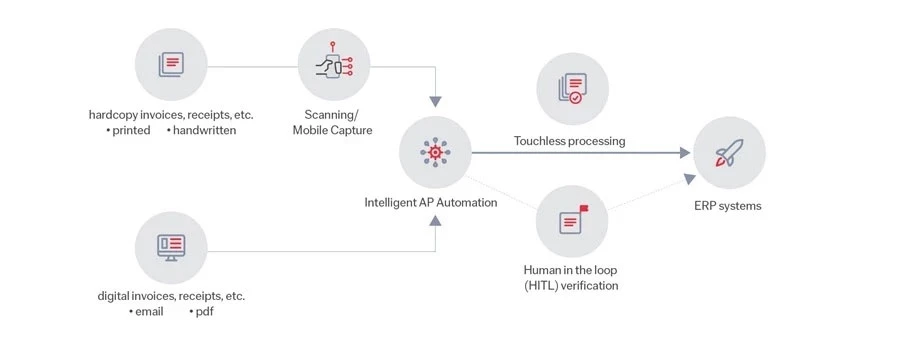
AP automation minimizes manual work by using smart software and optical character recognition (OCR) technology to accurately capture invoice details with little to no human intervention. These solutions integrate with your existing AP, robotic process automation (RPA), enterprise resource planning (ERP), and enterprise content management (ECM) systems to create end-to-end workflows.
AP automation steps:
-
Capture
First, AP automation captures invoices from all incoming sources—email, online portals, scanners, mobile uploads, and more—from both central and distributed locations.
-
Classify
After invoice capture, AP automation automatically identifies and organizes documents by type, then routes each document to the right next step for processing.
-
Extract
Once invoices are classified, AP automation extracts key details, based on the document type, like invoice number, date, total amount, and vendor information—a process known as field extraction.
-
Verify
At this stage, data accuracy is ensured using business rules, database lookups, and manual correction. With human-in-the-loop review, manual checks and corrections further train the solution to continuously improve. It automatically matches invoices to purchase orders (POs) and cross-references data with your ERP master database.
-
Deliver
The final stage is delivery of images and data to enterprise resource planning (ERP), enterprise content management (ECM), robotic process automation (RPA), and other systems.
Process AI can help take AP automation to the next level. While automation handles repetitive tasks, the insights provide businesses with deeper visibility into how their AP workflows are performing. By analyzing and tracking key performance indicators (KPIs) like straight-through processing (STP) rates and time spent on manual reviews, organizations can identify bottlenecks, optimize operations, and ensure continual improvement.
Manual accounts payable processing challenges
Old-school AP processing might seem manageable when your invoice volume isn’t high, but manual processes quickly turn into a headache as your business grows. Here’s why:
-
Time-consuming data entry
Processing invoices manually means someone has to type in every invoice number, date, amount, and vendor detail by hand.
-
High risk of human error
A simple typo can lead to a vendor dispute, a penalty, or a late fee, all because a number was entered incorrectly.
-
Poor invoice tracking
When invoices disappear into email threads or get lost in stacks of paperwork, finding the one you need—or tracking where it is in the approval process—becomes a frustrating scavenger hunt.
-
Slow processing times
Without automation, invoices can sit in approval queues because approvers are busy or simply don’t realize the documents need review.
-
Lack of visibility
Without real-time tracking, simple process questions—Which invoices are still pending? Where are bottlenecks happening? How much cash is going out?—get tough to answer, and expense planning can become a guessing game.
-
High labor costs
Manual AP processes demand a big team to handle data entry, validation, approvals, and issue resolution. Duplicate efforts can pile up too, further driving up payroll costs.
-
High transaction costs
In addition to high manual labor costs, inefficient AP processes can lead to expensive processing fees, late payment penalties, and compliance issues that can inflate costs and make each transaction more expensive.
-
Missed early payment discounts
Slow AP processing can delay approvals, leading to lost early payment discounts and other cost-saving opportunities.
Top 10 benefits of accounts payable invoice automation
Imagine a new, super-intern joins your AP team and speeds up workflows by ninefold overnight, all while synching data, preventing errors, and keeping a digital audit trail. That’s essentially what AP automation does. Here are some of its key benefits:
-
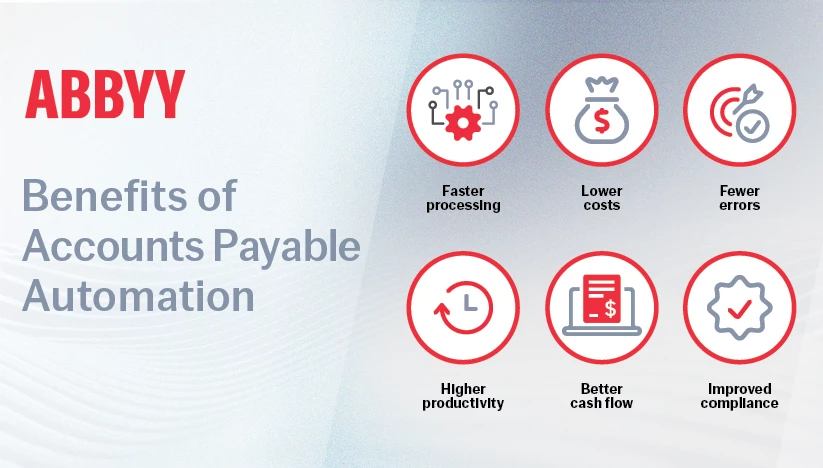
Faster processing and approvals
Documents move through workflows automatically and payments go out on time without you having to chase them down.
-
Lower costs
Automation lets you minimize manual labor, optimize payments, and avoid costly mistakes, dramatically cutting transaction costs so you can direct those gains toward growing your business. Digitizing document processes also saves paper printing and storage costs.
-
Fewer errors
Invoices are captured and processed with near-perfect accuracy—and fewer mistakes mean less time spent fixing mistakes.
-
Higher productivity
With data entry and approvals handled almost entirely by AP automation, your team’s time is freed up to focus on higher-level, strategic work.
-
Better cash flow
Real-time visibility into outstanding payments makes it easier to avoid late fees and take advantage of early-payment discounts.
-
Improved compliance
AP automation can reduce your risk of fraud, penalties, and audit issues by cross-checking to verify invoices meet government and industry regulations.
-
Better decision-making
With Process AI incorporated into the solution, real-time visibility into performance KPIs like STP rates and approval times empowers businesses to make data-driven decisions.
-
Scalability
AP automation grows with your business, handling increased invoice volumes without the need to hire additional staff or overhaul processes.
-
Enhanced vendor relationships
Faster, more accurate payments improve vendor satisfaction and strengthen partnerships, which can lead to better terms or opportunities.
-
Environmental impact
By reducing paper usage and digitizing processes, AP automation contributes to sustainability efforts, which can align with corporate social responsibility goals.
Accounts payable automation case studies
Here are some real-world examples of businesses that have realized big business benefits by switching to AP automation.
Financial Services: Banking technology provider Erste Digital needed to streamline invoice processing, payment slips, guarantee handling, and lease document management. With AP automation, the company sped document processing efficiency by 40%, reduced manual data entry errors by 40%, and achieved 35% cost savings.
Food and beverage: Norco, an Australian dairy cooperative, was processing 300,000 invoices manually every year. By switching to AP automation, they cut invoice labor by 50%, freeing up staff to focus on vendor relationships.
Manufacturing: Marine hardware manufacturer GEMLUX had sales reps spending 30–45 minutes manually entering 100-line purchase orders (POs) into NetSuite ERP. Supplier POs took a full day to consolidate by hand. AP automation cut PO processing down to 3–5 minutes and supplier PO management time by 75%.
Technology: Global automation leader Roboyo saw clients struggle with slow, error-prone manual entry of purchase orders. By integrating AP automation, they cut processing time by 80% and reduced costs by 55% while eliminating manual errors.
Transportation and logistics: Deutsche Post DHL Group had 90% of their payments automated, but the last 10% required frustrating manual intervention due to messy, inconsistent remittance data. AP automation with the capability to handle unstructured documents boosted efficiency by 70% and cut transaction costs.
Wholesale trade: Global wholesale giant METRO AG used to process every invoice by hand. After implementing AP automation, the company cut processing time by 90%.
How to select AP automation software for business
The right AP automation can do much more for you than just process invoices. Here’s what to look for:
- Smooth integration: The best AP automation software links effortlessly with your ERP, accounting software, and financial systems.
- Pre-built AI models: These models instantly recognize key invoice details, so you can start automating from day one without custom coding or a long setup.
- Invoice parsing: Choose a solution that can parse multi-page invoices and correctly process batches of invoices that are scanned together. Opt for a low-code/no-code solution that accurately detects page breaks and splits.
- Batch processing: Look for an AP solution that can batch-process hundreds or thousands of invoices in bulk.
- Customizable data extraction: A top-tier solution lets you capture both standard details of invoices and custom fields like tax ID or bank account numbers.
- AI-powered capture for unstructured data: Look for AP automation solutions that use AI and machine learning to extract data from any document format.
- Table header customization: Choose a low-code/no-code solution that lets you customize headers so that data is extracted accurately to speed information retrieval.
- Advanced processing skills and multi-language support: Your AP software should be able to process multi-page invoices, complex layouts and structures, and multiple languages to avoid translation headaches.
- Easy, low-code implementation: A low-code invoicing solution lets your team adapt quickly and make changes even without programming expertise.
How to integrate AI in your accounts payable invoice automation
AI makes AP automation smarter and more efficient, providing real-time insights into cash flow and spending to support business growth. Here’s how to integrate it into your AP automation.
- Figure out your needs: What are your key challenges? Slow invoice processing? Data entry errors? Lack of visibility? Know what you want to fix so you can make decisions that have the most impact. In addition, assess your AP team’s technical expertise to determine the right level of complexity for your solution.
- Choose the right solution: Opt for a purpose-built AI solution that’s specifically designed for AP automation. Since most AP teams aren’t made up of technical experts, low-code/no-code solutions are usually the most efficient choice. Use the criteria from the previous section to find an AI-powered AP tool with the right functionality for your business.
- Automate invoice and payment processing: Modern AI-powered AP automation solutions can start processing complex, multi-format documents from day one. Let your new AI-driven tools process invoices straight-through, error-free, regardless of format or source.
- Customize for your business: Fine-tune your AI tools to align with your business rules and compliance needs for maximum impact. Low-code/no-code solutions come with ready-to-use anomaly detection models that business users can easily customize and use.
- Monitor and optimize: Use AI-driven analytics to help you identify cost-saving opportunities in real-time and tweak payment schedules as the system continuously improves.
Why adding process AI matters
Automation alone is not enough to maximize accounts payable performance. Process intelligence adds a layer of continuous improvement by providing:
- Operational transparency: Track every invoice's status in real-time and identify where delays occur.
- Bottleneck analysis: Quickly identify stages in the approval workflow that slow down processing.
- Actionable insights: Use KPIs like average approval time, STP rate, and percentage of invoices requiring manual correction to fine-tune your processes.
Ultimately, Process AI empowers your AP team to proactively address inefficiencies and keep operations running smoothly, even as your business scales.
Smarter accounts payable automation with ABBYY
ABBYY’s intelligent AP invoice automation removes the manual hassle from your workflows. With AI-powered document processing, OCR, and machine learning, our solution handles invoices in any format, any language, and from any input source—from scanned documents to emails to handwritten text—capturing even complex data structures like tables with the highest accuracy. You get real-time visibility into cash flow and spending, helping you uncover cost-saving opportunities and make smarter financial decisions.
Discover how ABBYY can revolutionize your AP processes, saving time, reducing costs, and driving smarter financial decisions. Watch our AP automation video to see ABBYY in action, and connect with our experts to start transforming your AP workflows today.