November 12, 2025
How long does it take your business to process invoices from start to finish?
According to Ardent Partners' 2025 research, traditional invoice processing burdens businesses with an average cost of $9.84 and a cycle time of 8.2 days per invoice. With accounts payable (AP) automation, organizations can significantly reduce that cost and speed up the cycle time.
Modern AP automation solutions use AI to capture and extract information from a wide range of invoice formats, verify details, run compliance checks, and move structured data into business workflows—all with minimal human intervention.
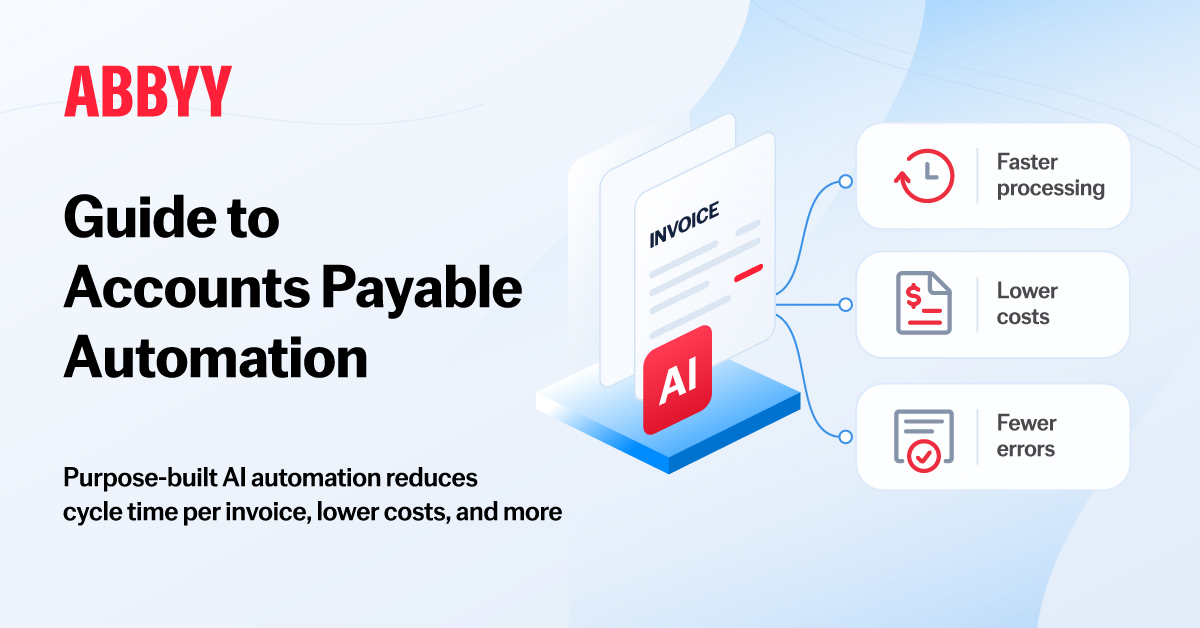
Here's a guide to understanding AP automation, how it transforms invoice processing workflows, and why businesses choose AI-powered solutions.
Jump to:
What is accounts payable (AP) automation?
How does accounts payable (AP) automation work?
What are the challenges of manual accounts payable processing?
What are the benefits of accounts payable automation?
What is straight-through processing in accounts payable automation?
How is AI used in accounts payable automation?
How are businesses using accounts payable automation?
How to select AP automation software for business
How to integrate AI into accounts payable invoice automation
How does AP automation support security and compliance?
Accounts payable (AP) automation refers to the use of technology to automate invoice processing, including matching invoices to purchase orders, capturing and validating data, and routing approvals. By reducing manual work, AP automation helps businesses process invoices faster with fewer errors and provides greater visibility into financial workflows.
Modern AP automation combines established document processing capabilities, such as optical character recognition (OCR), with AI technologies such as machine learning and neural networks, to process invoices in a variety of structures and languages and pass validated information to downstream systems.
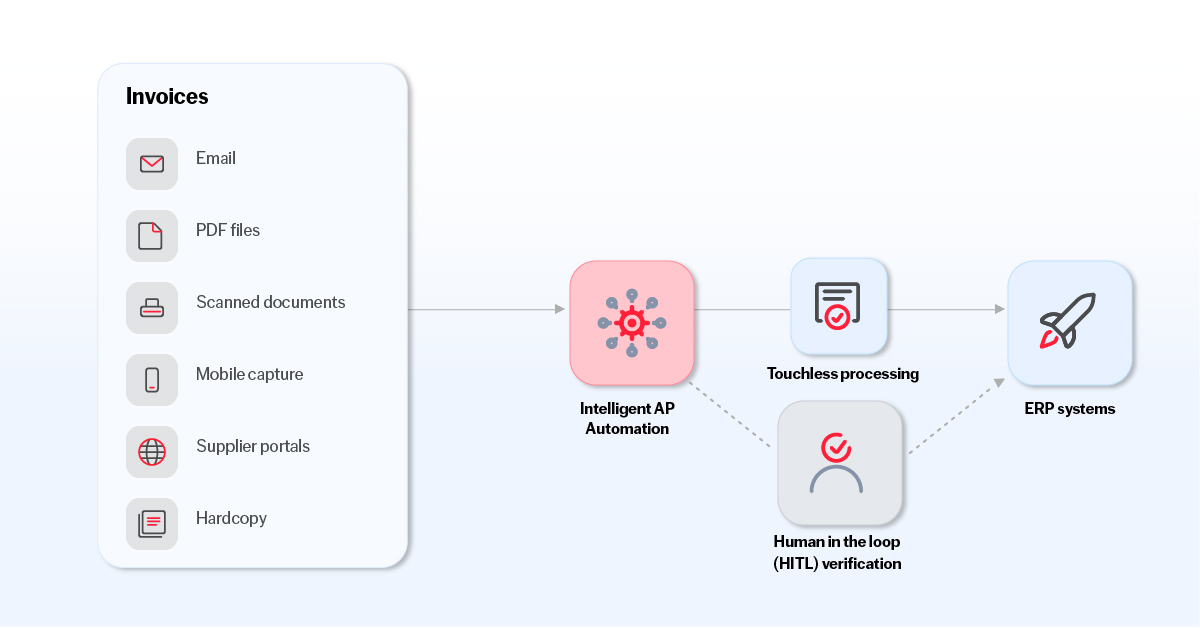
AP automation steps typically include:
Manual invoice processing can result in:
Key benefits of automated accounts payable include:
Straight-through processing (STP) is the completion of an automated workflow without manual intervention. In AP automation, that can mean capturing an invoice, extracting and validating its data, matching it against a purchase order, and sending it to the appropriate system for approval or payment without any human involvement.
Typically, STP is measured by the STP rate: the percentage of invoices that complete a defined workflow without manual intervention. For example, if 88 out of 100 invoices are processed automatically, the STP rate is 88%.
The goal with AP automation is to apply STP to routine invoices while making sure exceptions—such as documents with unfamiliar layouts, missing information, mismatched data, or low-confidence data extraction—get routed for human review.
AI technologies make it possible to automate invoice processing even when documents don't follow consistent templates or contain information that's difficult to extract using predefined rules.
With intelligent document processing (IDP), AI technologies like machine learning and natural language processing (NLP) are used to identify details such as invoice numbers and line items, even when they appear in different locations across documents.
Not every task requires the same type of AI. A hybrid approach combines purpose-built Document AI with large language models (LLMs). This brings together the consistency and control of established document processing with the flexibility of generative AI. Purpose-built technologies can handle predictable extraction and validation tasks, while LLMs help interpret and process more complex or unfamiliar invoices even without explicit training for these documents.
The best results are often achieved from using IDP and LLMs together, rather than only one or the other.
The accurate, structured data from Document AI can also support more advanced AI-powered workflows. LLMs can use this information to answer questions about invoices and other financial documents, in conjunction with retrieval-augmented generation (RAG) that allows these models to find and reference relevant business documents when generating answers. AI agents can use the information to carry out tasks like investigating invoice discrepancies or requesting missing details from vendors.
Here are some real-world results organizations have achieved with AP automation:
Financial Services: Banking technology provider Erste Digital needed to streamline invoice processing, payment slips, guarantee handling, and lease document management. With AP automation, the company sped document processing efficiency by 40%, reduced manual data entry errors by 40%, and achieved 35% cost savings.
Food and beverage: Norco, an Australian dairy cooperative, was processing up to 300,000 invoices manually every year. By switching to AP automation, they cut invoice labor by 50%, freeing up staff to focus on vendor relationships.
Wholesale trade: Global wholesale giant METRO AG used to process every invoice by hand. After implementing AP automation, the company cut processing time by up to 90%, from one to two days to about one hour.
Government: When a major New Zealand government agency needed to process more invoices without adding staff, digital transformation partner Quanton implemented ABBYY Document AI. The agency sped processing by more than 80%, reduced errors by over 60%, and lowered overall costs by more than 55%.
The right AP automation solution for your business will depend on your specific needs and circumstances. Factors to consider include:
Look for a solution that can extract data from the types of invoices your business receives, regardless of variations in layout, format, or complexity. Consider whether it can:
The solution should recognize standard fields such as invoice numbers, dates, and totals, but also offer the option to customize for fields that are specific to your business without requiring extensive manual configuration for every supplier.
Find out if the solution relies on one AI model for every task, or can use different technologies depending on the document and processing requirements. A hybrid approach that enables you to easily integrate an LLM into your intelligent document processing workflow can offer both consistency for predictable tasks and flexibility for more complex documents.
To maximize STP without sacrificing accuracy, choose a solution that lets you configure validation rules and confidence thresholds and routes exceptions for human-in-the-loop review.
Check whether the solution works with your existing ERP, accounting, and other business systems. Ideally, you can connect the solution quickly and easily with prebuilt connectors, APIs, or other integration options.
Since invoices often contain sensitive financial and supplier information, look for a solution with strong data protection measures, access controls, and audit trails. Evaluate the vendor's security certifications and data-handling policies, as well as its ability to support your compliance requirements. If the solution uses generative AI, ask how the underlying models are hosted and governed.
Find out how long the solution will take to deploy. Ideally, you can begin automating without extensive custom coding or a long setup. Look for pre-built AI models that can be implemented immediately, and features that let team members configure extraction requirements, adjust validation rules, and review exceptions. A low-code solution can allow business users to adapt and make changes even without programming expertise.
Ask vendors to demonstrate performance and establish how results will be measured. Processing time, cost per invoice, extraction accuracy, and STP rates can all help determine whether the solution will deliver value. Beyond the subscription or licensing price, consider the time and cost of integration and maintenance, and the manual work required both to get started and with ongoing use.
Integrating AI into AP automation lets your business process a wider range of invoices with less model training and configuration.
Review which invoices still require manual handling. For example, your existing automation might struggle with unfamiliar layouts or more complex structures.
A hybrid approach combines a purpose-built intelligent document processing (IDP) platform with the flexibility of large language models (LLMs), allowing you to move beyond standard data extraction. This approach enables advanced capabilities like summarization, contextual reasoning, and automated communication.
Before passing information to downstream systems, establish checks to verify the accuracy of AI-generated outputs. Use business rules, confidence thresholds, and human-in-the-loop (HITL) verification to manage uncertain or inconsistent results.
Track whether AI is improving extraction accuracy and reducing exceptions to improve STP rates. Use the results to adjust your automation strategy.
Accounts payable teams handle sensitive information that must be processed according to company policies and applicable regulations, but also be kept secure. AP automation helps achieve both goals by providing:
AI-powered AP automation can also support compliance by keeping records of how invoice data was processed and what checks—including human reviews—were performed. Access controls and clear data-handling policies help protect sensitive financial information, while audit trails make it easier to prove that established procedures were followed.
ABBYY Document AI takes the manual hassle out of AP workflows. We combine proven document processing technologies with the flexibility of generative AI—a hybrid approach that offers reliability alongside the flexibility to work with unfamiliar or complicated invoices.
With ABBYY Document AI, you get accurate, structured data that your existing systems can use. That data can also give you visibility into your workflows and support LLM-powered applications and AI agents. We back our technology with ISO 27001 certification, SOC 2 Type II assessments, and established AI governance policies. You can learn more about how we protect your information in the ABBYY Trust Center.
Get in touch to see how you can simplify invoice processing and make the most of AI-powered workflows.
Many routine AP tasks can be automated to process the majority of invoices without manual intervention. However, invoice discrepancies and unusual transactions may still require human review.
AP automation solutions typically connect to enterprise resource planning (ERP) systems through APIs, prebuilt connectors, or other integration methods. This can allow the solution to retrieve supplier and purchase order information to validate extracted data, and to send that data to the ERP for downstream processes like accounting and payment processing.
AP automation reduces the need for manual data entry, which is a common cause of invoice processing errors. Automation solutions can also check invoice information against purchase orders, existing records, and business rules to flag discrepancies and potential errors before they move further through the process.
AP automation solutions can help protect sensitive financial information through security measures like access and authentication controls. They can also support compliance by maintaining audit trails that show how invoices were processed, who approved them, and when. Solutions that incorporate LLMs should come with strong data governance policies that show how data is used and protected, and how AI-generated results are validated.

Maxime Vermeir
VP of AI Strategy at ABBYY
Maxime Vermeir is Vice President of AI Strategy at intelligent automation and enterprise artificial intelligence company ABBYY. He focuses on helping enterprises move artificial intelligence (AI) from experimentation to execution, translating advances in large language models (LLMs), agentic systems, and other AI technologies into a hybrid approach that delivers measurable business outcomes.
Working at the intersection of strategy, process, and technology, Maxime advises organizations on how to operationalize AI at scale across real-world workflows. He also co-hosts the podcast "AI Pulse" together with Dr. Marlene Wolfgruber, where they explore emerging AI trends and their practical impact on enterprises in bimonthly episodes.
Follow Max on LinkedIn. For media inquiries, please request an interview with Max here.
